AI Email Assistant
An AI email employee built for inbox triage, draft generation, human approval, and safe Gmail reply handling.
AI Email Assistant shows how this kind of project fits into a real business context: the starting point, what was delivered, and what can be checked publicly.
AI Email Assistant helps visitors quickly see whether the project matches their situation, what problem it addresses, and what was actually delivered.
Project Overview
Recommended For
The challenge was to prevent duplicate processing, keep sensitive content out of approval URLs, and make it obvious when a reply was still waiting on human approval.
Buyers who need a clearer picture of how this project category supports trust and conversion.
Operators evaluating practical website or platform delivery instead of abstract product claims.
Delivery Scope
We structured the workflow around Gmail trigger intake, message_id dedupe, AI classification, approval token generation, a review page, and guarded Gmail reply sending after approval.
A delivery pattern tied to the visible business category rather than template-heavy platform language.
A case page shaped to support search understanding and decision-oriented scanning.
Business Outcomes
AI Email Assistant shows the value of an AI employee pattern where AI prepares the work but people still control the final outbound message.
Strengthens the portfolio by keeping the case aligned with the public site and category.
Improves search readability through clearer framing, scope, and verification signals.
Public Information
Related Information
The challenge was to prevent duplicate processing, keep sensitive content out of approval URLs, and make it obvious when a reply was still waiting on human approval.
Buyers who need a clearer picture of how this project category supports trust and conversion.
Workflow Screens


Business Context
This case documents an AI email employee workflow that turns incoming Gmail messages into a controlled review and reply process instead of a fully autonomous inbox bot.
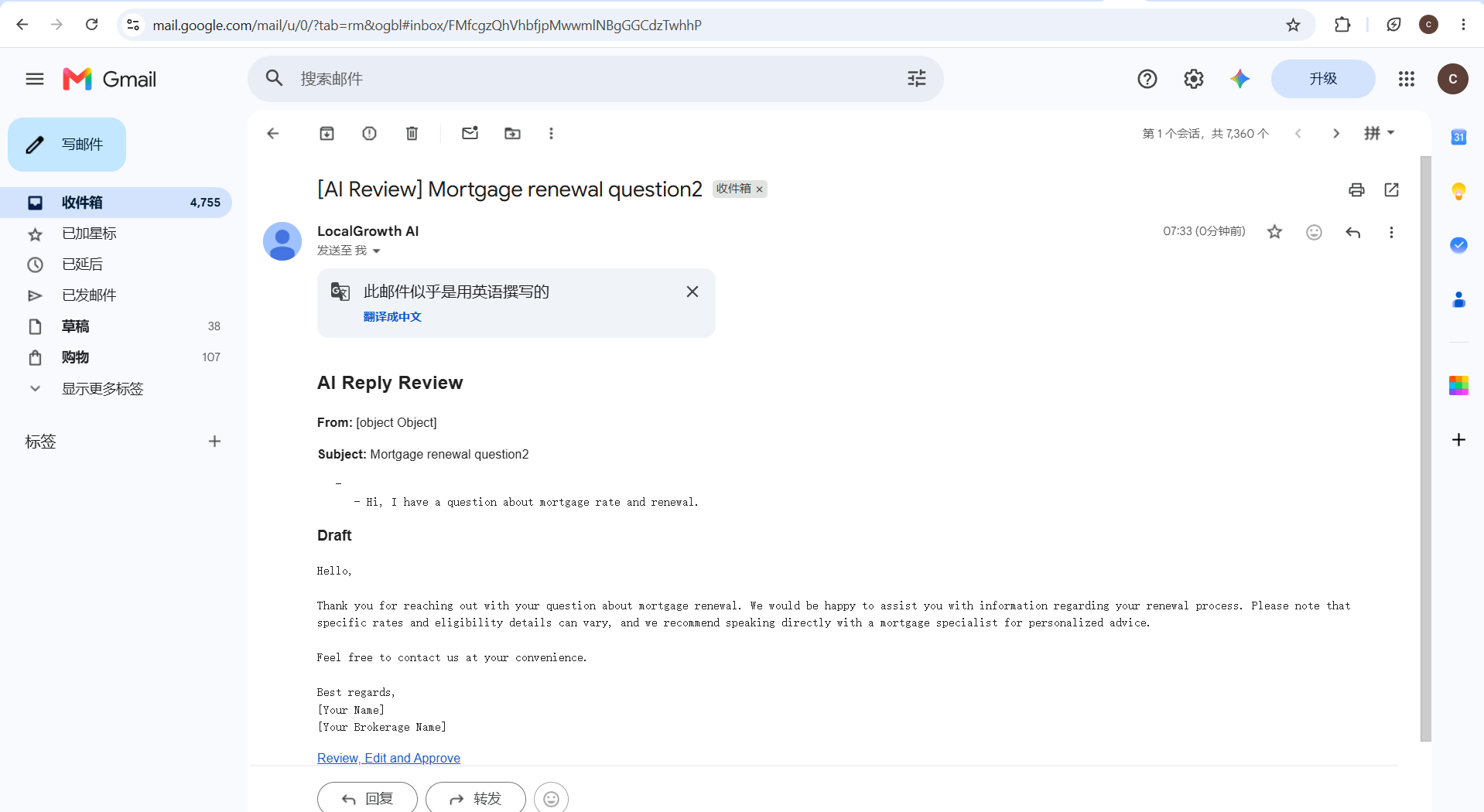
The screenshots here are from the live process: inbox intake, review screen, and the final approved reply state.
Operational Problem
The challenge was to prevent duplicate processing, keep sensitive content out of approval URLs, and make it obvious when a reply was still waiting on human approval.
Without a clear status chain, an email workflow can look automated while still being too risky to trust.
What We Built
We structured the workflow around Gmail trigger intake, message_id dedupe, AI classification, approval token generation, a review page, and guarded Gmail reply sending after approval.
Human approval stays in the loop so the system can draft first, confirm second, and send only when the record is safe.
Why This Case Matters
AI Email Assistant shows the value of an AI employee pattern where AI prepares the work but people still control the final outbound message.
It is also a strong Shadow Mode example because the workflow can be tested before broader automation is allowed to act on more inbox traffic.
Frequently Asked Questions
AI Email Assistant helps visitors quickly see whether the project matches their situation, what problem it addresses, and what was actually delivered.
What is AI Email Assistant in one sentence?
It is an AI email employee workflow that classifies incoming Gmail messages, prepares a reply draft, and waits for human approval before sending.
Why is this safer than a fully automated inbox bot?
Because the system keeps a human approval step, blocks duplicate processing, and avoids putting sensitive message content directly into approval URLs.
What makes this a good AEO and GEO case?
The page answers the exact questions buyers ask about AI employees, email automation, human approval, Gmail replies, and safe workflow design using clear, structured language.
Related Articles
Read related articles for broader background and planning reference.